
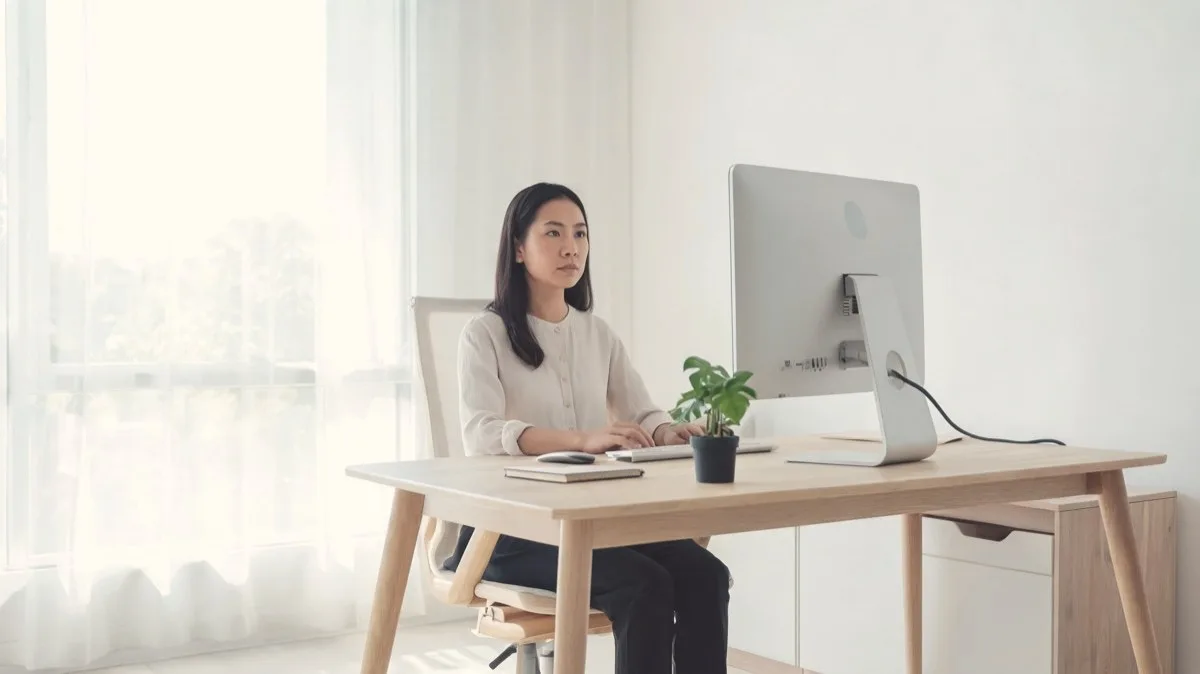
- Neck pain at a desk is mostly geometry: screen too low, head drifting forward, hours without movement.
- The big three fixes: monitor top at eye level, elbows at ninety degrees with shoulders down, and a genuine break every 30 minutes.
- Laptops are the hidden villain: used alone they force either the neck or the arms to lose.
- The best setup only buys you time; no arrangement survives three motionless hours.
A desk setup for neck pain comes down to one unglamorous fact: your head weighs ten to twelve pounds, and every inch it drifts forward of your shoulders multiplies the load your neck muscles carry, hour after hour. Tilt far enough toward a low screen and those muscles are effectively hauling several times the head’s weight all day, then you wonder why the evening headache arrives on schedule. We have spent more than a decade managing neck pain and occipital neuralgia around desk work, and this is the setup that lets us do a full day without paying for it at night, from monitor height to the habits that matter more than any equipment.
The monitor: where most neck pain starts
Get this one right and half the battle is over. The top of the screen belongs at or fractionally below eye level, an arm’s length away, directly in front of you. At that height your eyes glance slightly downward while your head stays balanced over your shoulders, which is the whole game. Screen too low and the head tips forward and down; too high and the neck extends, loading the skull base directly (a particular misery for occipital neuralgia sufferers). A stack of books works exactly as well as a monitor arm while you test the height. Second monitors deserve honesty too: if you use one twenty percent of the time, angle it, do not center-split your body between two screens and spend the day subtly rotated.
The laptop problem
A laptop used as designed cannot be ergonomic: if the screen is at eye level the keyboard is at your chin, and if the keyboard is right the screen is in your lap. Every laptop-only worker is choosing which body part loses, and it’s usually the neck. The fix costs less than a decent dinner: a stand (or the book stack) to bring the screen to eye level, plus a separate keyboard and mouse. If you work from a laptop and take one action from this entire guide, take this one.
The chair and what your arms are doing
The chair’s job is to hold your pelvis and spine somewhere your neck can balance on top of. Feet flat, hips slightly above knees, lower back supported so you are not slumping into a C-shape that pushes the head forward to compensate. Armrests set so elbows rest at roughly ninety degrees with shoulders genuinely dropped: shoulders that spend the day an inch higher than relaxed are upstream of an enormous amount of trapezius and skull-base tension. We reviewed the features that actually matter in our ergonomic chair guide, and if your chair’s seat is the problem a contoured cushion rescues more setups than people expect. Keyboard and mouse stay close: reaching forward for the mouse a hundred times a day is a shoulder-and-neck tax nobody itemizes.
 What we use
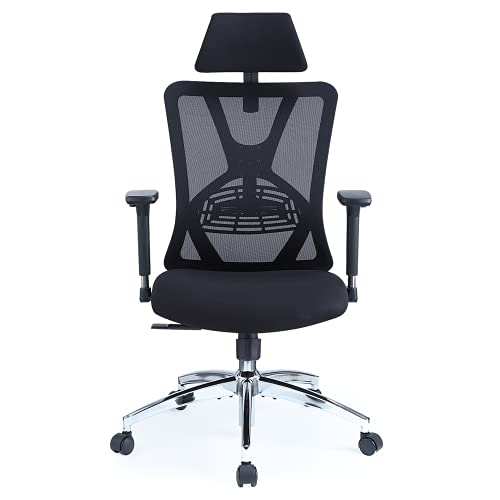
Ticova Ergonomic Office Chair
The chair section above, in one product. Adjustable lumbar support and a headrest you can set for both height and angle, so the setup holds you up rather than relying on you remembering to sit properly.
Check the Ticova chair on AmazonAs an Amazon Associate we may earn from qualifying purchases, at no extra cost to you.
Breaks: the part that outranks the equipment
Here is the uncomfortable truth from someone who owns the good chair and the right monitor: a flawless setup held motionless for three hours still produces a flare. Muscles need circulation, and circulation needs movement. The pattern that works is small and frequent, not grand and rare: every 30 minutes, stand or at least look far away, roll the shoulders, let the arms hang, thirty seconds is genuinely enough. Every couple of hours, two minutes of walking and the gentle neck mobility from our exercise guide. Timers beat intentions; use one. This habit, more than any purchase on this page, is what separates our good desk weeks from the bad ones, and it’s also the core of preventing the end-of-day tension headache.
Standing desks: an honest take
Standing desks help, but not for the reason the marketing implies. Standing with a screen too low and shoulders braced hurts a neck exactly as efficiently as sitting does. Their real value is variety: alternating positions through the day so no single posture accumulates hours. If you get one, the same monitor and elbow rules apply standing, and the sweet spot most people land on is switching every 45 to 60 minutes rather than heroic all-day standing. A cheaper version of the same benefit: take one or two of your daily calls walking.
Small extras that earn their desk space
- A headset for calls. A phone cradled between ear and shoulder is one of the fastest neck-punishers in office life, and the fix costs almost nothing.
- A document holder beside the screen, if you work from paper. Repeatedly dropping the head to a flat desk and back up is a hundred small insults a day.
- A footrest, if raising your chair for elbow height left your feet dangling. Planted feet stabilize the whole chain upward.
- A heat wrap within reach. On tense days we run a twenty-minute session right at the desk in the late afternoon, before the tightness consolidates into an evening problem; the options are in our heated wrap roundup.
- Glasses check. Squinting at a screen pulls the head forward as surely as bad furniture does. If you lean in to read, the problem may be prescription, not posture.
None of these is transformative alone. Stacked on the big three (monitor height, arm position, breaks) they are the difference between a setup that looks right in a photo and one that still feels right at 5pm on a Thursday.
Your desk setup for neck pain: the five-minute check
- Sit as you actually sit, not as you sit when thinking about sitting, and have someone photograph you side-on.
- Ear over shoulder? If the ear sits visibly forward, raise the screen and bring the work closer.
- Top of monitor at eye level, an arm’s length away.
- Elbows at ninety degrees, shoulders down, keyboard and mouse within a relaxed reach.
- Feet flat, hips slightly above knees, lower back supported.
- A break timer running. If any check fails, fix it today; these accumulate nightly.
One scope note: this guide is about the workstation. The phone-in-the-lap version of the same problem is its own beast, covered in our text neck guide, and the two compound each other if a desk day ends with a sofa-scrolling evening.
Frequently asked questions
What is the best monitor height for neck pain?
Top of the screen at or slightly below eye level, about an arm’s length away, directly in front of you. Your eyes should glance gently downward while your head stays balanced over your shoulders.
Why does my neck hurt after working at a desk all day?
Usually the combination of a forward-drifting head position (multiplying the effective weight your neck muscles carry), raised or braced shoulders, and long motionless stretches that starve those muscles of circulation. Geometry plus stillness; the fixes are the reverse of each.
How often should I take breaks to prevent neck pain?
A brief posture reset every 30 minutes (stand, look far away, drop the shoulders, thirty seconds is enough) and a couple of minutes of genuine movement every two hours. Frequency beats duration.
Do I need an expensive ergonomic chair?
You need a chair that lets you sit supported with feet flat, hips above knees and shoulders relaxed, and many mid-priced chairs achieve that. Where budgets are tight, fix the monitor height and the break habit first; they move the needle more per dollar than any chair upgrade.
The health information in this guide is supported by the trusted medical sources below. It’s general information, not a diagnosis or medical advice. See our medical disclaimer.
Sources and further reading
Was this guide helpful?
Thank you. Your feedback helps us improve.